---
updatedAt: 2025-08-12T14:22:47.000Z
agentTools:
projectIndex: https://docs.glassix.com/llms.txt
---
# Image and File URLs
# Overview
Glassix uses Amazon S3 to store and serve attachments such as images, PDFs, and other file types. To secure these files, we generate presigned URLs, which are time-limited links that allow access to specific objects stored in S3 without requiring authentication.
The most common places for you to encounter a presigned URL are:
* Copying an image address
* Copying an attachment address
* Extracting an image or attachment URL in a flow, via the API or via one of the SDKs
* Sending an external email with an attachment from Glassix
Every time you do run into a presigned URL, it will look something like this:
```http
https://glassix-private-prod.s3.eu-central-1.amazonaws.com/104062512182470_whatsappim_jt9bzvcu_890af5b7-d7d1-4f46-9e71-046ba12ae96a.jpg?X-Amz-Expires=21600&X-Amz-Algorithm=AWS4-HMAC-SHA256&X-Amz-Credential=AKIAQ5NFYO37DHIHUM5Q%2F20250612%2Feu-central-1%2Fs3%2Faws4_request&X-Amz-Date=20250612T084120Z&X-Amz-SignedHeaders=host&X-Amz-Signature=a11491c6e749e6557f1c2bfa919a6b7a03d875db086f1a7e3818f23cd3e81066
```
> 🚧 **Note:**
>
> If you've copied a link either from the UI or from an API return, and the link follows the format above, you are working with a presigned URL.
>
> Presigned URLs don't function like normal links, so it's important to read through the information below.
# Expiration
All S3 presigned URLs generated by Glassix expire 6 hours after they're created. This is a fixed limit defined by our implementation of Amazon S3.
When you attempt to open an expired presigned URL, you will see an error message like the ones below:
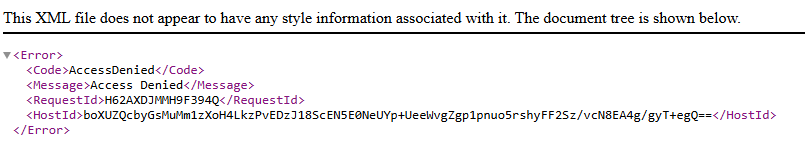
```xml
AccessDenied
Request has expired
21600
2025-06-01T19:38:42Z
2025-06-15T13:31:20Z
71WNDSDKJFHZST3JKHNFMXzLyUanwtx4Az6ohsjmNrtyfAZgAKWN2zqhBWUvtVFbU7hfaAeT6LNj9GCWbzSE0Ilo5Zcuk4HMV9Jgie
```
> 📘 **Info:**
>
> For more details on how presigned URLs work, you can refer to the official AWS documentation:
# Where You Will Find Presigned URLs
## Agent Console (UI)
When viewing an attachment in a conversation, a new presigned URL is generated automatically each time the conversation is loaded.
Behavior: If the previous URL has expired, a new valid URL will be created without requiring any action from the agent. Expired links are seamlessly refreshed on page reload.
## API Responses and Webhooks
When you retrieve a message using the API or receive a webhook event, the attachment URL provided is a presigned URL.
Important: These URLs are also valid for 6 hours. If accessed after that period, they will return an error such as 403 Forbidden or Access Denied.
Recommendation: Consume or download the file immediately upon receiving the API response or webhook. If needed later, call the relevant API again to obtain a new URL.
## Flows
When you retrieve the URI of attachments in a flow via the **Last customer attachment URI** or via a dynamic parameter, the attachment URI provided is a presigned URL.
If this URL is then sent directly to the end-user in a message, or if this URL is sent in an external email, it will expire.
Important: These URLs are also valid for 6 hours. If accessed after that period, they will return an error such as 403 Forbidden or Access Denied.
Recommendation: Consume or download the file immediately upon receiving external email. If sending to end-users, include a note about the expiration time for the link. If needed later, call the relevant API again to obtain a new URL from the ticket where the flow was used.
## Email Conversation History
Presigned URLs may appear in outbound emails only when an agent replies to a customer and the email includes embedded images from the conversation history (such as screenshots, pasted images or images in signatures of prior emails in the chain).
> ❗️ **Important:**
>
> These image links are time-limited and may expire after 6 hours. If an image fails to load in an email chain, it may be due to the expiration of the presigned URL embedded in the quoted history.
There is no expiration for:
* Attachments sent to customers
* Interactive document links
* Any file explicitly attached or linked in the email body
# Regenerating Presigned URLs
If you need a new presigned URL for one of your uploaded files, you can get one by:
* Re-requesting the conversation via the API (GET /conversations/\{id})
* Triggering a new webhook event (e.g., reassignment or tag update)
* (If in the Agent Console) Refreshing the browser tab and copying the newly-generated link
Glassix will automatically refresh presigned URLs whenever they're loaded in the UI.