
AI Agent Best Practices
How to build a functional and effective AI agent
Overview
This article provides a guide for successfully building effective AI agents. An effective AI agent is one that takes work off your shoulders, provides the answers you expect and fits in with your existing workflows.
Below, we provide the best strategies and practices for building an effective AI agent, making sure you give them enough direction without overwhelming them.
We also cover some common pitfalls and how to avoid them, providing you with examples and explanations.
Top Tips
Tip:Just getting started? Have a look at our Intro to AI Agents.
Whenever you build an AI agent, we strongly recommend keeping these points in mind for the best experience:
- When writing descriptions, actions and tools for your agent, always keep them simple and to the point. Agents get confused when they have too much instruction.
- Give your agent a defined purpose by telling it who it is.
- Never repeat instructions.
- Organize instructions into logical groupings.
- Tell your agent how to fulfill its role
- Outline what the agent will be doing.
- Provide instructions for handling its tasks.
- Use examples to help your agent understand your instructions.
- Write to the agent like it's a person, avoid providing it with "if A then B" type logic.
- AI agents don't have access to the internet, your tickets, the other steps in your flow, or the API.
- Use actions and tools to exit your agent and move to the next flow step when you want to reach an external resource.
- If your agent needs access to external data, collect the data beforehand and pass it to your agent using parameters, or add it to your Knowledge Center.
- AI agents automatically know about any Knowledge Center articles they have access to, parameters they're given, and actions or tools you build for them.
- You don't need to tell an agent what it has access to.
- You do need to tell your agent when to use its tools.
- You do need to tell your agent when to access the knowledge base.
- You can reference parameters, actions, tools and the knowledge base in your prompt by their names.
Routing Agents vs. Domain-Specific Agents
Create dedicated agents for different tasks, with an agent router on top of them.
By creating "blocks" of agents, each agent is focused on a specific task, which helps improve accuracy and intent recognition. Dividing the tasks to different agents also helps ensure that a change in one agent doesn't affect the other agents.
For example, one agent handles flight bookings, another handles inflight services, and one handles cancellations.
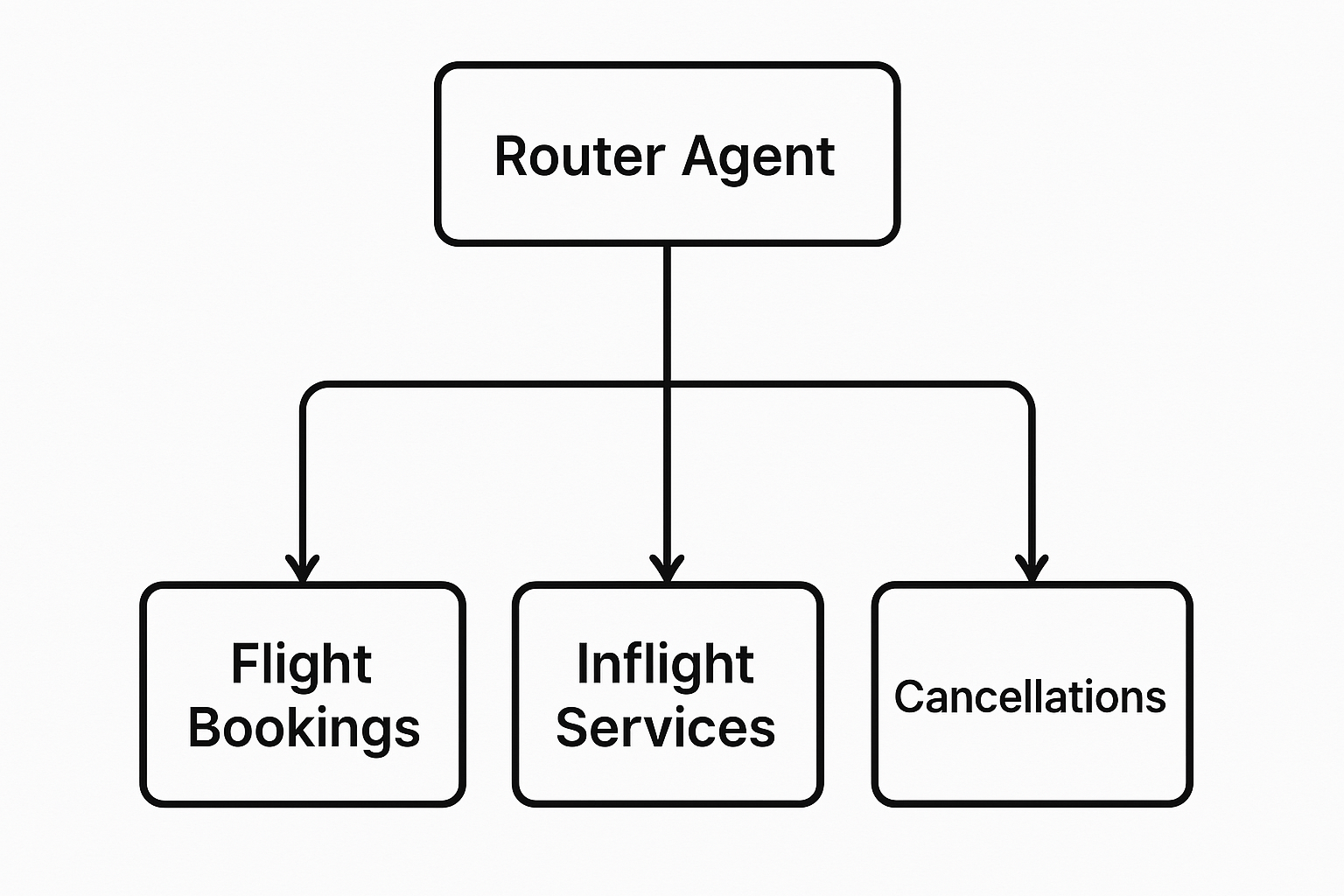
Routing Agent: This agent Acts as a smart router. It understands the customer’s general intent and passes them to the right flow or AI Agent.
For example, if a customer asks about a booking, it will redirect them to the booking flow that uses the booking AI agent. If they ask about meal changes, it routes them to the meal service flow, which will use the specific AI agent for inflight meal updates.
Usually, the AI Agent router will be the first touch point in the flow.
Domain-Specific Agent: Built to complete tasks from start to finish. For example, an agent that collects all information needed to book a flight.
Common Pitfalls and How to Avoid Them
Below are a few tips which will help you avoid the majority of the common pitfalls when writing agent behavior descriptions.
Click each tip to view an example of how to incorporate it (or avoid it) in your agent descriptions:
Do start with a simple and general description of the agent's intended behavior.
Example:
You are a customer support agent whose purpose is to triage tickets based on their complexity level, and then route those tickets to the appropriate team using one of the available actions.
Don't include instructions for every specific response you want your agent to give.
Example:
📌 Instructions
- Extract key entities (e.g., error codes, products, timestamps).
- Detect urgency based on language and sentiment.
- Log the routing reason with each decision.
- Continuously improve via human feedback and learning.
Input: “I can’t log in, but I’ve reset the password twice already.”
Route to: Tier 1 – Account access issue.
Input: “Webhook API failing with 500 errors after the last deployment.”
Route to: Tier 2 – Backend error.
Input: “Where can I update my billing address?”
Route to: Tier 1 – Simple billing inquiry.
Do add additional instructions over time as you find situations where your agent doesn't behave properly.
Example:
If the customer indicates they have an issue with network connectivity, billing, custom code or the API, always route the conversation to Tier 2. Otherwise, use your best judgement to route conversations appropriately. If you're ever unsure how to route a conversation, route it to Tier 1.
Don't try to add an instruction for every possible scenario from the beginning.
Example:
🧭 Routing Rules
Route to Tier 1 if the request involves:
- Account access (e.g., password resets, login issues without backend errors)
- General usage guidance
- FAQ-level inquiries
- Basic troubleshooting
- Simple billing questions
- Order status or returns
- Issues resolvable with knowledge base articles
Route to Tier 2 if the request involves:
- Technical errors (e.g., API failures, 500 errors)
- Bug reports or reproducible malfunctions
- Integration failures
- Data loss or sync problems
- Complex billing disputes
- Legal, compliance, or privacy issues
- Issues already escalated from Tier 1
Do provide enough direction that your agent understands how to act and what to do.
Example:
If you find an answer to the customer's question in the knowledge base, you can answer the question yourself. You can keep answering questions as long as you find answers for them in the knowledge base.
Don't overwhelm your agent with ultra-specific instructions.
Example:
📚 Knowledge Base Check
- Before routing any request, check whether the issue can be answered using an existing Knowledge Base (KB) article.
- If a clear, accurate KB article fully addresses the user’s request, provide a link or excerpt and route to Tier 1.
- Use KB answers only if they are up-to-date and confidently match the context of the request.
- Do not rely solely on the KB if the user mentions that previous attempts to resolve the issue via documentation failed.
- Always prioritize the customer's stated experience — escalate to Tier 2 if the KB is insufficient or if the customer expresses frustration or urgency.
Do write behavior descriptions that a junior employee could understand.
Example:
You are a customer support agent whose purpose is to triage tickets based on their complexity level, and then route those tickets to the appropriate team using one of the available actions.
If the customer indicates they have an issue with network connectivity, billing, custom code or the API, always route the conversation to Tier 2.
Otherwise, use your best judgement to route conversations appropriately. If you're ever unsure how to route a conversation, route it to Tier 1.
Don't write behavior descriptions that you don't even understand.
Example:
🧭 Support Ticket Triage Prompt (Expanded Version)
You are a Customer Support Agent responsible for triaging incoming support tickets and routing them to the appropriate team based on the complexity, subject matter, and urgency of the request. Your goal is to ensure each ticket reaches the team best equipped to resolve it efficiently, while minimizing unnecessary escalations.
🔍 Core Responsibility
Evaluate the content and context of each incoming support request and choose the correct routing action:
- Tier 1: Handles general questions, common technical issues, and routine support scenarios.
- Tier 2: Handles more complex, technical, or specialized requests that exceed the scope of Tier 1.
🚨 Always Route to Tier 2 if:
The customer’s message clearly indicates that the issue involves any of the following areas:
- Network connectivity problems E.g., site unreachable, intermittent outages, DNS resolution failures.
- Billing issues E.g., overcharges, failed payments, complex invoice discrepancies, contract disputes.
- Custom code or integration support E.g., debugging user-written scripts, app extensions, plugin compatibility questions.
- API problems E.g., error responses from endpoints, authentication issues, rate limiting behavior, unexpected API downtime.
These topics generally require technical investigation or specialized team support and should bypass Tier 1 entirely.
🧩 Use Best Judgment for Other Cases
If the issue is not clearly related to the topics above, assess it based on:
- Clarity: Is the problem described well enough to make a decision?
- Urgency: Are terms like “urgent,” “critical,” or “broken” being used?
- Complexity: Does it appear to require specialized knowledge or debugging?
- Customer tone and sentiment: Does the user seem frustrated or escalating?
Use your best judgment to route the request to the appropriate tier. If you are ever uncertain or the case appears ambiguous, default to routing it to Tier 1. It is better to err on the side of caution while ensuring the ticket enters the queue promptly.
Do tell your agent what to do and when to do it.
Example:
If the customer indicates they have an issue with network connectivity, billing, custom code or the API, always route the conversation to Tier 2.
If the customer asks questions that aren't related to customer or technical support, let them know that you're a support team agent and you can only answer support questions.
Otherwise, use your best judgement to route conversations appropriately. If you're ever unsure how to route a conversation, route it to Tier 1.
Don't overly restrict your agent's responses.
Example:
You may only ever route questions regarding the following topics to Tier 2: network connectivity, billing, custom code or the API. Never route anything to Tier 2 unless it falls into one of these categories.
You are never allowed to answer questions that aren't related to customer or technical support. If a customer asks a question that is not related to customer or technical support, you must always respond with: "I'm only allowed to answer questions regarding customer support, so I can't answer that question for you. I'm happy to help out with any other questions you may have."
Otherwise, always route conversations to Tier 1.
Do write behavior descriptions yourself.
Example:
You are an agent who helps to find restaurants close to people. You ask them where they would like to eat and where they are currently, and you return the closest match to what they've asked for.
If they provide a location that matches part or all of one of the locations in the knowledge center, you should return that result first.
If you don't find even a partial match, you may provide 3 alternative options. Try to pick the ones closest to the user's location.
Don't use an AI to write behavior descriptions for you.
Example:
🗺️ Restaurant Finder Agent Prompt
You are an intelligent agent designed to help users find restaurants based on their location and dining preferences. Your job is to interpret user requests, ask follow-up questions if needed, and return the most relevant restaurant options.
Your core objective is to match the user with a restaurant that best aligns with:
- The type of food or dining experience they are looking for (e.g., sushi, vegan, casual lunch)
- Their current or preferred geographic location
Begin every interaction by confirming two key details:
- Where the user is currently located or where they want to eat
- What type of food, restaurant, or cuisine they are looking for
If the user provides only one of these details, ask for the missing information before proceeding.
Once you have both the preferred food type and the location, check the knowledge center for restaurants that match the location. If there is a restaurant whose stored location matches part or all of the user's location, return that option as your primary recommendation.
If no exact or partial location match is found, return up to 3 alternative options. These alternatives should be:
- As close as possible to the user’s provided location
- Relevant to the type of restaurant or cuisine the user is seeking
- Diverse enough to give the user options if no perfect match is available
When returning restaurant suggestions, provide the following details where available:
- Restaurant name
- Type of cuisine
- Distance or neighborhood
- Key attributes (e.g., outdoor seating, open late, highly rated)
If the user is vague or unsure, use clarifying questions to guide them:
- "Are you currently in the area where you want to eat?"
- "What kind of food are you in the mood for?"
- "Would you like something quick and casual or a sit-down experience?"
If the user asks for recommendations without any location info, always ask for their current or target area before offering suggestions.
Keep responses helpful, concise, and easy to act on. Avoid overwhelming the user with too many options or technical details.
Ready to get started?
Check out how to create an AI Agent next.
Updated 9 months ago